Character consistency
A character is consistent when every image shows the same person: same face, hair, body and outfit. Mira, the example character here, should keep her long dark waves and olive-gray pants in every scene.
AI image tools can change the face, hair or outfit of a character between images. Learn three techniques that can help: a three-panel sheet, a neutral gray background and a hidden face.
Each technique prepares the reference image itself, before any scene prompt is written.
Put a portrait, a front view and a back view in one image. Each panel shows different details of the same character.
Place every panel on plain light gray. The character stands out, so details are easier to see and compare.
Remove the face from the full-body front view, so the portrait holds the only detailed face. Treat this step as an experiment.
These two ideas explain the problem, so the fix makes sense when you build it.
A character is consistent when every image shows the same person: same face, hair, body and outfit. Mira, the example character here, should keep her long dark waves and olive-gray pants in every scene.
Image models that use diffusion start every image from random noise, so one prompt gives a new picture each run. Run any short character prompt twice and compare the details it leaves open.
One image with three panels, each with its own job, plus the exact prompt that made the first version.
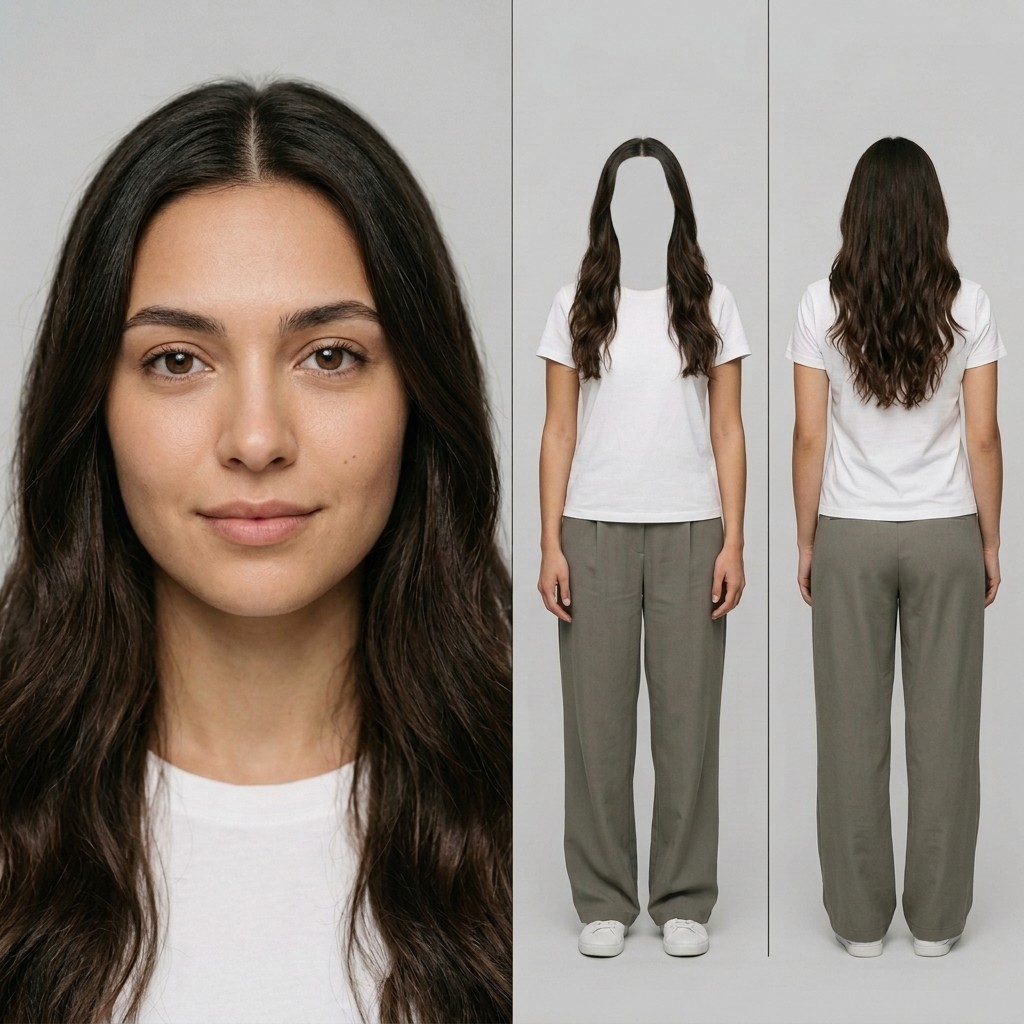
One image holds three vertical panels side by side: a portrait, a full-body front view and a full-body back view. Each panel shows details the others cannot. Below: first the original, then the final version.
A front-facing portrait shows the complete head, the face, the hairstyle and hair color, the neck and the upper chest. It is the main reference for facial identity.
A full-body front view shows the outfit, the arms and hands, the legs, the shoes and the body proportions. In this sheet the face and neck are removed, and the hair stays.
A full-body back view shows the complete hairstyle from behind, the outfit from behind, the body proportions and the shoes. It fills in what the front cannot show.
The portrait answers what the face looks like, the front answers what she wears, and the back answers how the hair and outfit look from behind. No single panel holds all of it.
This text-only prompt, with no source image, made the first version of this sheet, shown above. Swap the character details and keep the layout lines.
Cinematic character reference sheet, split-frame layout, photorealistic. Left panel — facial close-up: a 25-year-old young woman, warm light olive skin tone, the entire head fully inside the frame including all the hair, nothing cropped, long dark brown wavy hair with a center part, expressive brown eyes, naturally defined eyebrows, soft natural facial features, real skin texture with subtle pores, calm neutral expression with a gentle smile, looking straight into lens. Shot on 85mm portrait lens, shallow depth of field, soft cinematic key light with gentle fill. Right panel — full-body front and back views side by side: the same young woman shown twice within this panel — on the left, a full-body front view facing the camera; on the right, a full-body back view photographed from directly behind. In both, she stands straight in a normal relaxed pose, arms hanging down at her sides, full height in frame head-to-toe, average height (1.65m), natural feminine body proportions, slim build, warm light olive skin, long dark brown wavy hair with a center part, same casual outfit consisting of a plain white short-sleeve T-shirt, loose high-waisted olive-gray wide-leg pants, and white sneakers. The front view shows her face and the front of the garment; the back view shows the back of her head, full hair length, shoulders, garment seams and the rear of the pants and shoes. Both figures matched in framing, scale and lighting for consistency. Shot on 35mm lens, even full-length lighting. Look: clean studio character sheet, plain solid light grey background (#E5E5E5), consistent character across all views, soft diffused cinematic lighting, muted natural color grade, fine detail, true-to-life skin tones, vertical divider lines separating each view.
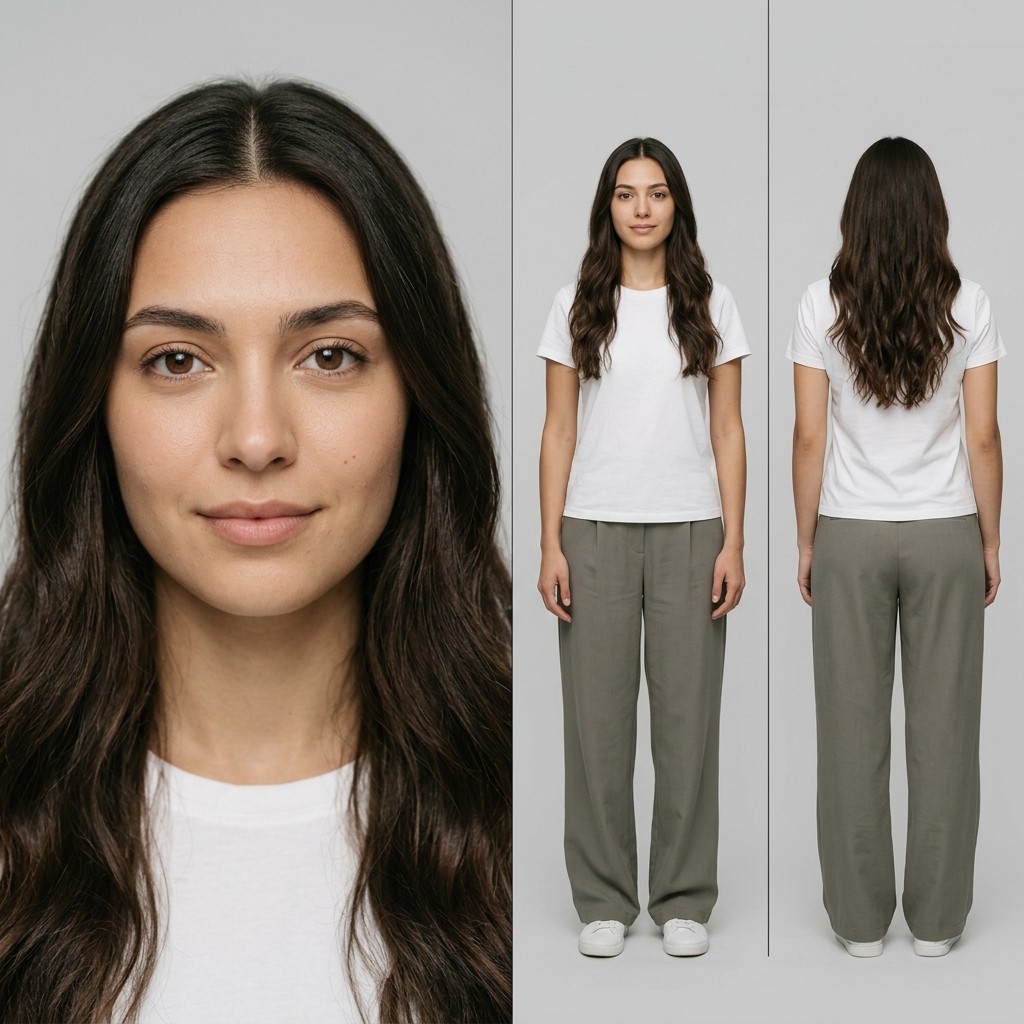
A plain light gray background keeps the character easy to read and the panels easy to compare.
Plain light gray separates the character from the background and keeps clothing edges easy to read. Nothing competes for attention, so the panels are easier to compare.
The sheet prompt asks for solid light grey in its last paragraph, so both versions of the sheet share one plain background. That makes the two easy to compare in Technique 3 below.
State the background as one plain color, such as solid light grey with the value #E5E5E5. To fix an existing image, attach it as a reference image and run the one-line prompt below.
make solid light grey background (#E5E5E5) for @reference_image
A gray background prepares a cleaner reference, but it is not proven to improve identity consistency. How much it helps can vary from model to model.
An experimental way to keep the detailed face in the portrait panel only.
Keep the detailed face in the portrait only. The front view then carries the outfit and body, and the back view carries the hairstyle and outfit from behind.
The first version of the sheet shows the face twice: in the portrait and again in the full-body front view.
An edit removed the face and neck from the front view, and the hair stays around the blank space. Attach the first version as a reference image, then run the edit prompt below.
remove the face and the nick from the right panel in the front shot.
This is an experimental way to organize references. It is not shown to make a model favor the portrait or to guarantee a better face, so compare results with and without it.
Two notes that apply to all three techniques.
A reference narrows the gaps but does not close them. When Midjourney launched its character reference in 2024, it noted that exact freckles and T-shirt logos would not carry over.
Test which reference images work best for what you are building. Try different angles in the character sheet, such as a side view, and compare the results.