Idea · Hook
A hook
A hook is the opening moment of a short video, made to stop the scroll and keep people watching. This one is 5 seconds long: a toddler stomps on a comment.
This hook shows a toddler stomping on a mean comment until it crumples like paper. Build it from three images and one prompt, then swap in your own place, character and comment.
Three images and one prompt make a 5-second hook.
Make the playground, the toddler sheet and the comment card as separate images. Each image covers one part of the scene.
Add the images to Higgsfield as references: playground first, toddler second, comment card third. The prompt names them in that order.
Paste the hook prompt and generate the clip. The prompt asks for a vertical 9:16 shot that lasts exactly 5 seconds.
Both ideas explain how the clip is built, so the prompt makes sense when you read it.
A hook is the opening moment of a short video, made to stop the scroll and keep people watching. This one is 5 seconds long: a toddler stomps on a comment.
The prompt treats the comment card as a flat graphic fixed to the video frame, like a sticker added in an editor. It stays still until the toddler stomps on it.
A clean, empty playground that the video keeps as its set.
The prompt asks for an empty playground shot about 70 cm up, at toddler eye level. It asks for 9:16 three times, but this run came out square. The video still came out vertical.
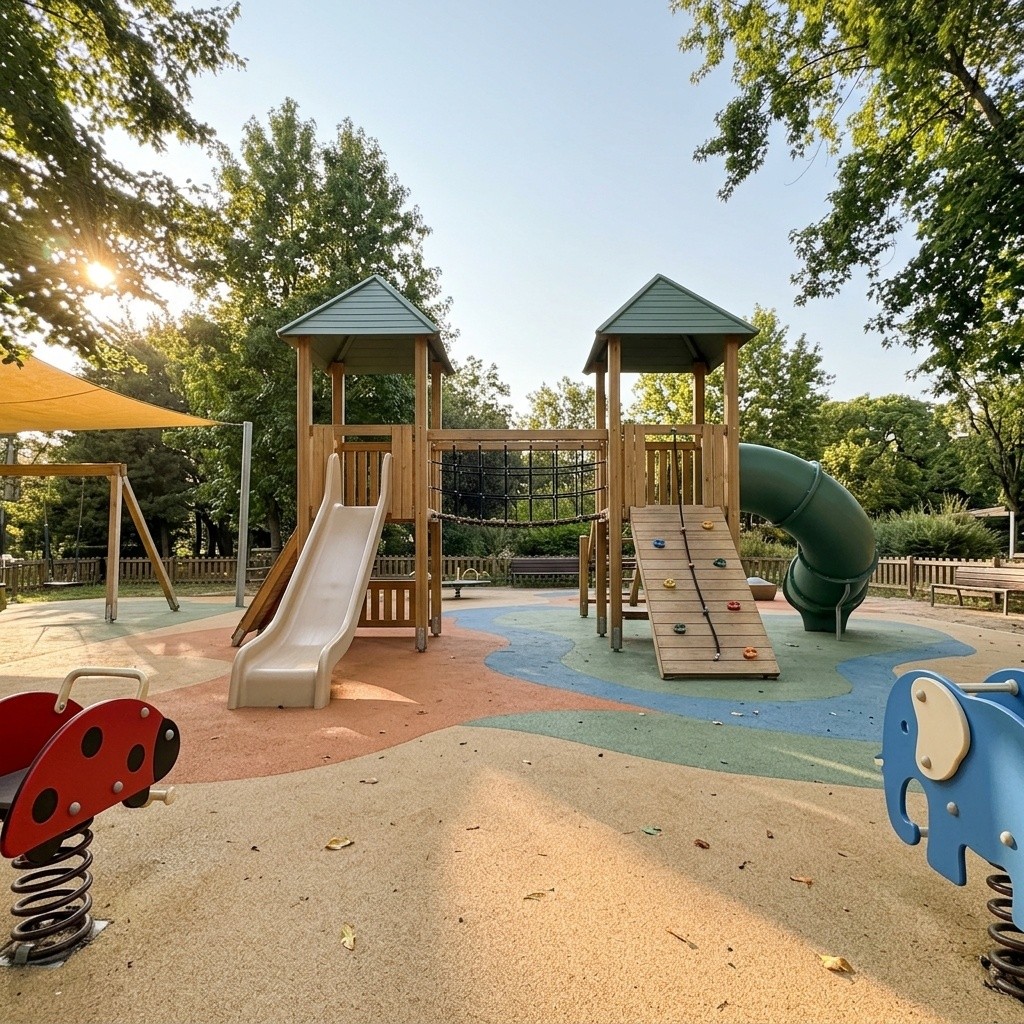
Vertical 9:16 realistic smartphone photograph of a beautiful, cozy outdoor playground designed for toddlers and young children aged 1–5. Shot straight on from a low, toddler-eye-level perspective, approximately 70 cm above the ground. Balanced, nearly symmetrical composition. No people, no children.

**BACKGROUND AND UPPER HALF:**

A beautiful clear pale-blue sky occupies the upper portion of the frame. Tall leafy green trees surround the playground, with branches extending naturally into the upper corners. Warm golden afternoon sunlight filters through the leaves from the upper left, creating delicate sun rays and soft natural shadows.

**CENTER — MAIN PLAYGROUND STRUCTURE:**

A large, attractive wooden playground structure positioned in the middle of the frame.

Two elevated square wooden play towers with dark sage-green pyramid-shaped roofs, connected by a suspended rope bridge with black safety netting.

The left tower features a smooth, wide, light beige plastic slide extending toward the foreground.

The right tower features a wooden climbing ramp with colorful climbing holds in muted blue, yellow, orange, and red.

A curved dark green enclosed tube slide extends from the right side of the structure.

Natural light-oak wooden posts, soft green panels, rounded edges, and child-friendly proportions.

The playground structure should feel inviting, safe, beautifully maintained, and realistic.

**FOREGROUND:**

A spacious soft rubber playground floor in warm sandy beige, terracotta orange, muted blue, and sage green, featuring large flowing abstract shapes.

On the lower left edge of the frame, a cute red ladybug spring rider with black spots and small black antennae, partially visible.

On the lower right edge, a cute blue elephant spring rider with a pale cream ear and curved trunk, partially visible.

Both spring riders face slightly inward toward the central playground.

Leave an open area of textured rubber flooring in the immediate foreground, creating a sense of depth and space.

**SIDE DETAILS:**

On the far left, a partially visible wooden swing set beneath a warm yellow shade sail.

Additional small playground structures, low wooden fences, greenery, and trees appear softly in the background.

The park is clean, peaceful, well maintained, and completely empty.

**LIGHTING:**

Beautiful warm golden-hour afternoon sunlight coming from the upper left.

Natural sunlight creates long, soft shadows across the rubber playground floor.

Gentle highlights on the wooden structures, slides, and spring riders.

Bright, cheerful, welcoming atmosphere with realistic outdoor lighting.

**CAMERA AND PHOTOGRAPHY:**

Vertical 9:16 composition.

Realistic smartphone-camera photography.

Low camera position at toddler eye level.

Wide-angle perspective with natural depth.

Main playground structure in sharp focus.

Slightly softer distant background.

Natural colors, realistic textures, subtle photographic softness, and balanced exposure.

Photorealistic appearance, not cartoon, not illustration, not 3D animation.

**STRICT CONSTRAINTS:**

No people.
No children.
No animals.
No text.
No logos.
No watermarks.
No fantasy elements.
No exaggerated colors.
No distorted playground equipment.
No overly saturated lighting.

**FINAL RESULT:**

A beautiful, realistic, sunlit neighborhood playground for toddlers, photographed from a low angle on a warm afternoon. Natural wooden play structures, colorful spring riders, soft rubber flooring, leafy green trees, and a peaceful, inviting atmosphere.

Aspect ratio: 9:16.
One sheet shows the toddler in six views, as the reference for his face, hair and clothes.
Three close-ups and three full-body views show the same toddler in denim overalls. The hook prompt uses the sheet as his identity reference. The Consistency Basics covers how to build one.

A made-up comment, drawn as a flat graphic, for the toddler to stomp on.
The prompt spells out every line of the card and asks for exact spelling. Swap the quoted lines for your own comment, and keep the rules about no phone, feed or scenery.
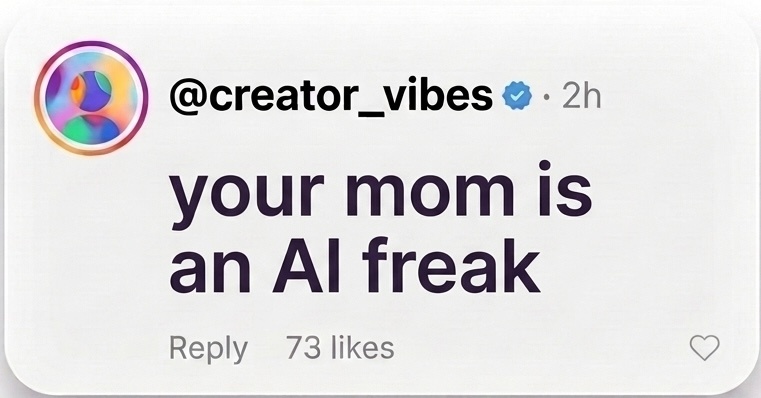
Create a realistic Instagram-style social media comment card as a standalone graphic element.
The comment card should look like a genuine Instagram comment overlay used in Reels.
Design requirements:

* Clean, modern Instagram-inspired interface.
* White or very light background.
* Softly rounded rectangular card.
* Small circular profile picture on the left.
* Clear, readable comment text.
* Authentic social media typography.
* Natural spacing, alignment, and proportions.
* Subtle visual hierarchy.
* Minimal, professional appearance.

Username line:
"@creator_vibes" with a blue verified badge, followed by "· 2h"
Comment text:
"your mom is an AI freak"
Footer:
"Reply" and "73 likes" on the left, with a small heart icon on the right
Preserve the exact spelling, capitalization, and punctuation of all text.
The card must be perfectly front-facing, with no perspective distortion.
Create the card as an isolated graphic with a transparent background.
No smartphone mockup.
No Instagram feed.
No surrounding interface.
No additional comments.
No decorative elements.
No hands or people.
No background scenery.
The result should look like a polished Instagram comment sticker that can be placed directly over a video in CapCut or Google Flow.
Upload the three elements in order, paste the prompt and generate a 5-second clip in Higgsfield.
The result from Seedance 2.5 on Higgsfield, made with the prompt below in one 60-credit run. Upload the three images in this order before you paste the prompt.
SCENE CONTEXT

A toddler boy stands in a beautiful outdoor playground. A social-media comment card is digitally overlaid at the bottom center of the video frame, exactly like a comment graphic added during Instagram Reel editing.

The toddler notices the comment, raises his right foot, and playfully stomps directly onto the center of the on-screen comment card.

At the moment of impact, the flat digital comment graphic magically gains physical paper-like properties and crumples inward beneath his shoe.

This creates a clever, visually satisfying interaction between a real character inside the scene and a graphic element attached to the viewer's screen.

ACTIVE REFERENCES

<<<image_1>>>: PLAYGROUND.

Use the provided playground image as the exact location reference. Preserve the wooden play structures, slides, colorful rubber flooring, trees, warm sunlight, and original composition.

<<<image_2>>>: TODDLER.

Use the provided toddler character as the exact identity reference. Preserve his face, hairstyle, body proportions, clothing, shoes, and animation style without changes.

<<<image_3>>>: COMMENT CARD.

Use only the social-media comment card from the reference image, excluding its surrounding background.

Preserve the exact text, avatar, typography, rounded corners, colors, proportions, and layout.

SCREEN-SPACE COMMENT OVERLAY — ABSOLUTE PRIORITY

The comment card is a 2D graphic overlay attached directly to the VIDEO FRAME, NOT to the playground environment.

It looks exactly like a social-media comment sticker added in Instagram or CapCut during editing.

The comment card is positioned horizontally at the BOTTOM CENTER of the 9:16 frame.

The card faces the viewer perfectly front-on, with no perspective distortion.

Its edges remain parallel to the screen edges.

It does NOT follow the perspective of the playground floor.

It does NOT lie on the ground.

It does NOT cast shadows onto the playground.

It does NOT move with the camera or the environment.

It remains fixed at the same screen coordinates until the toddler interacts with it.

The card is crisp, flat, matte, and fully opaque, like a professionally composited Instagram comment graphic.

FIRST FRAME

The toddler is already standing in the center of the playground, facing the camera.

His full body, including both feet, is visible.

The social-media comment card is already displayed at the bottom center of the video.

The comment graphic partially overlaps the lower part of the playground image, exactly as a social-media overlay would.

The card is completely still.

CAMERA

Vertical 9:16 composition.

Single continuous shot.

Static frontal camera.

No zoom, no panning, no tilting, no camera shake.

Keep the toddler centered and the comment card anchored to the bottom center of the screen.

ACTION TIMING — 5 SECONDS

0:00–1:00 — NOTICE THE COMMENT

The toddler looks down toward the comment graphic at the bottom center of the screen.

He tilts his head slightly with a curious, playful expression.

The comment card remains completely flat and motionless, fixed to the screen.

1:00–2:00 — PREPARING TO STOMP

The toddler shifts his weight onto his left leg.

He lifts his right foot toward the camera and positions it directly above the center of the on-screen comment.

His foot moves forward in depth, toward the viewer, creating the illusion that he is about to step onto the screen itself.

The comment card remains fixed in its original screen position.

2:00–3:00 — BREAKING THE SCREEN BOUNDARY

The toddler brings his right foot down directly onto the EXACT CENTER of the comment graphic.

His shoe visually passes IN FRONT OF the digital comment overlay, temporarily covering its central text.

At the exact instant of visual contact, the comment card begins to deform.

The center of the card collapses inward beneath the shoe.

Sharp paper creases spread outward from the point of impact.

The left and right edges fold inward toward the center.

The graphic transforms smoothly from a perfectly flat digital sticker into a crumpled, paper-like version of itself.

This is an intentional, playful mixed-reality illusion.

3:00–4:00 — EXAGGERATED CRUMPLE

The toddler applies a small additional downward pressure with his foot.

The comment card compresses further into itself.

Its rounded rectangular shape collapses toward the center, forming overlapping folds and wrinkles.

The crumpling is exaggerated and satisfying, like a playful cartoon visual effect.

The original text and avatar distort naturally along the paper folds.

The toddler's shoe remains visibly in front of the card.

4:00–5:00 — REVEAL

The toddler lifts his foot away from the screen.

The comment card remains crumpled at the bottom center of the frame.

It does not return to its original shape.

The toddler looks toward the camera with a small, mischievous smile.

The playground remains unchanged behind him.

CRITICAL VISUAL EFFECT — 2D TO 3D INTERACTION

Before contact, the comment card is a completely flat, screen-fixed digital overlay.

It must look like an Instagram comment sticker, NOT a physical object in the playground.

The toddler's shoe moves toward the camera and overlaps the graphic.

The instant his shoe touches the comment, the graphic reacts as if it were made of paper.

Only the comment graphic deforms.

The playground background does not deform.

The effect is a seamless transition from 2D screen graphics to 3D paper-like deformation.

The crumpled graphic remains visually attached to the screen area rather than falling onto the playground floor.

The illusion must feel deliberate, clean, creative, and professionally edited.

LIGHTING AND STYLE

Warm golden afternoon sunlight in the playground.

Natural shadows and realistic character lighting.

The comment card retains the clean, neutral appearance of a digitally added social-media graphic.

Do not apply the playground's perspective or ground shadows to the overlay.

High-quality cinematic animation with polished social-media motion graphics.

AUDIO

Soft outdoor playground ambience.

A crisp, satisfying paper-crumpling sound precisely synchronized with the stomp.

A subtle playful impact sound.

No dialogue.

No music.

No subtitles.

STRICT CONSTRAINTS

The comment MUST look digitally pasted onto the video.

The comment MUST remain fixed at the bottom center of the screen.

The comment MUST NOT appear on the playground floor.

The comment MUST NOT have ground perspective.

The comment MUST NOT cast environmental shadows.

The toddler's shoe MUST appear IN FRONT OF the comment during impact.

The card MUST crumple inward from its exact center.

The card MUST NOT crumple before the shoe touches it.

No floating card in the playground.

No card moving independently before impact.

No card disappearing or dissolving.

No camera movement.

No character identity changes.

No extra limbs.

No scene transitions.

FINAL ABSOLUTE PRIORITY

Create the illusion of a toddler physically interacting with a social-media comment that was digitally added to the video.

The comment starts as a perfectly flat, screen-fixed Instagram-style overlay at the BOTTOM CENTER of the frame.

The toddler stomps directly onto its center, visually placing his shoe IN FRONT OF the graphic.

The comment dramatically crumples inward like paper while remaining in the same screen area.

The effect should look like a clever, seamless, professionally edited Instagram Reel.

DURATION: EXACTLY 5 SECONDS.
The overlay section, marked absolute priority, describes the card as a flat overlay fixed to the screen. It faces the viewer, ignores the floor perspective and casts no shadows. The strict constraints repeat these rules.
The action timing splits the 5 seconds into five one-second beats. Each beat says what the toddler and the card do.
Two notes before you make your own version.
Swap the place, the character or the comment, and edit the lines that describe them in the prompt. Keep the overlay rules, the timing and the upload order.
Compare each clip with the prompt before you post it. If a detail is off, change one section of the prompt at a time between runs, since each run costs credits.